Funk keyboard lessons with a groove coach: Play funk that feels right, not just notes that are right.
On The One hears every note you play and grades the pocket: where it lands, how hard you hit it, how long you hold it, and how much space you leave. 41 lessons, an endless jam band, and a straight line to Ableton.
On your phone? Leave your email and we'll send you the link on launch day.
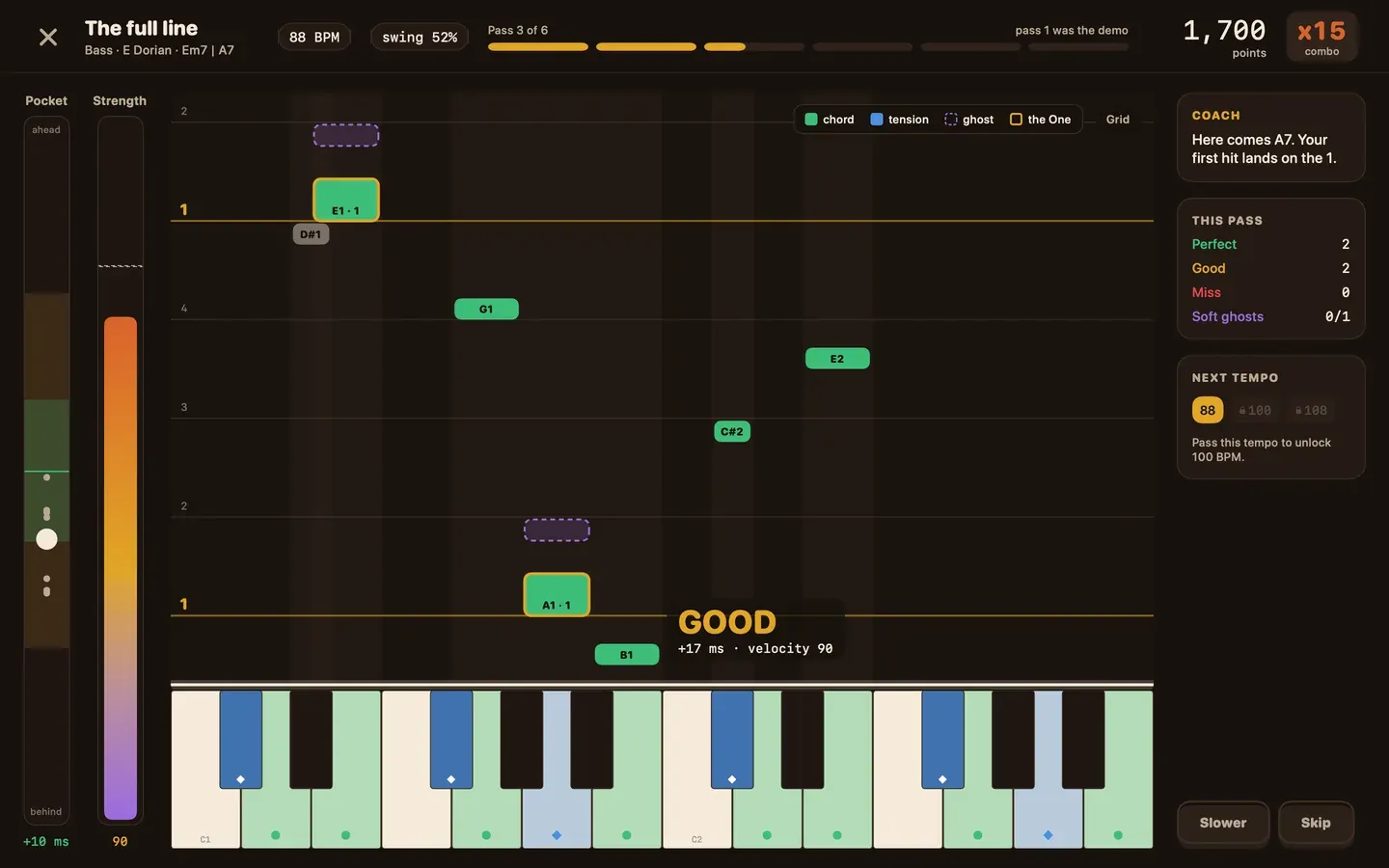
The actual app, not a mockup. Notes fall onto your keyboard, and every hit tells you if you were early or late, too hard or too soft.
You know the notes. So why doesn't it sound like funk?
You learned the chords. You can play the riff. Then you play it over a beat and something's off. It's stiff. It's polite. Nobody moves.
Here's what nobody tells you: funk isn't in which notes you play. It's in when you play them, how hard, how short, and what you leave out. A few milliseconds early and the groove rushes. One ghost note too loud and it goes flat. Hold a stab too long and the pocket closes.
Most piano apps can't hear any of that. They check that you hit the right key, hand you a star and move on.
Right notes. Wrong feel. That's the gap.
On The One grades the pocket.
Every take is measured from what you actually played, then scored on the four things that make funk feel like funk.
Where it lands
Ahead of the beat, on it or behind it, in milliseconds. You watch every note land on the grid.
How hard you hit
Accents that pop and ghost notes that whisper. Velocity is half the groove, so it counts.
How long you hold
Short stabs stay short and sustains ring. On funk keys, the cutoff is part of the rhythm.
How much space you leave
Rests are notes too. Overplay and the band disappears, so extra notes cost you.
Same notes. Different feel.
Where your notes landed · illustrationOn The One scores this difference on every take and shows you exactly where each note fell. Then it gives you one thing to fix on the next take. Not a lecture. One instruction you can act on right now.
Can you play on the One?
This is Catch the One, one of the mini-games inside the app. A funk loop plays. Tap the big button on every One, the first beat of each bar, for eight bars. You'll see if you rush, drag or sit right in the pocket.
How it works
Turn your sound on. Bluetooth headphones add delay, so wired headphones or your speakers give a more honest number. Keyboard users: focus the button and press Space on each One.
This browser can't play the loop. Try Safari or Chrome on your Mac.
That's one number from one beat. In the app, every take is scored on timing, dynamics, articulation and space, on every note, after a 16-click calibration that removes your setup's delay.
Every lesson runs the same five-step loop.
Listen
Hear the groove with the band, and find it in the records it comes from.
Understand
Why it works, in plain words, with A/B examples you hear side by side.
Play
Your take, graded on timing, dynamics, articulation and space.
Vary
Change one thing, an accent, the swing, a passing note, and hear what it does.
Create
What you master unlocks a piece for your own grooves in Funk Lab.
No theory background needed. Before You Play, a four-chapter intro, starts from zero: what the One is, what a pocket feels like, and the chords funk is built on.
Real screens. No mockups.
Every screen in this section is a capture of the app running on a Mac, with sample progress. Tap any of them to see it full size.
A 12-minute session that builds itself every day around what you need most: a game, a review, a lesson and a free jam. Your streak and your Groove Index live here.
Modules laid out as a path with stars per lesson, daily missions, your timing over the last 14 days and the next thing you unlock.
Notes fall onto your keyboard and every hit is graded live: how early or late, and how hard. Dashed blocks are ghost notes. Pass a tempo to unlock the next one.
Stars, XP and a score for each of the four metrics, where every note landed on the beat, and the one thing to fix next with a one-minute drill.
An endless band in ten funk styles. The keys light up by what each note does over the chord and change right on the chord change. Hover a key to see why.
The placement test checks what your hands can play and what you understand, then tells you where to start. You can always start from scratch instead.
Every piece you unlock lands here. Arrange a full groove with drums, bass, keys, lead and horns, then send it to Ableton or export it.
Funk's story from the New Orleans second line to neo-funk. Cards and records unlock as you learn, not by date.
More from inside the app
Everything you get when you open it.
The traffic-light keyboard
Jam over an endless band in ten classic funk styles, and the keys light up by what they do over the chord: green for chord tones, blue for color notes, purple for blue notes, red for the one to avoid. They change right on the chord change, so you learn by ear and by eye at the same time. When you're ready, blind mode hides the colors and leaves you with your ear.
Always safe
Adds flavor
The grit
Clashes here
41 lessons in 8 modules
From counting sixteenths to writing your own tune. Ghost notes, stabs, clavinet and Rhodes comping, bass lines on the keys, horn lines and arranging. Modules end with a boss you have to beat to move on.
A daily session that builds itself
Today picks what you need: a new lesson, a quick review of what you're about to forget, a mini-game. About 12 minutes. XP and streaks keep you coming back, but they never decide if you passed. Your playing does.
A placement test that's honest
Play a few bars and answer a few questions ("I don't know" is a real answer). You get a map of what you understand next to what your hands can actually do, and you start where you belong.
Funk Lab, straight to Ableton
Every concept you master unlocks a piece: drums, bass, keys, horns. Build a full groove and send it to Ableton Live over virtual MIDI, or export MIDI files and a WAV.
The story behind every groove
A one-minute story opens every lesson, from the sixties to today, and every fact comes with its source. Guided listening tells you exactly what to listen for in the original records.
A private coach on your Mac
On Macs with Apple Intelligence, an on-device coach explains your takes in plain words. No account, no cloud. Your takes never leave your Mac.
Song Lab
Paste a YouTube link of a funk track, loop any part, slow it down, mark the sections and play along with the record.
And a lot more
No theory needed. We'll teach you the funky stuff.
Funk lives in a handful of chords and a few notes that add grit. You don't need to know any of them today: the app teaches them one lesson at a time, by ear first. Press play to hear where you're headed, or grab the free two-page cheat sheet for your keyboard stand.
Chords you'll learn to groove with
Chords that kill the groove (we'll show you why)
Which notes sound good? The keys tell you.
Tap a key to hear it over the band's chord. Green always fits, blue adds color, purple adds grit, red clashes. In the app your keys light up like this while you play, so you learn by ear and by eye. No theory first.
Sounds that bite
Sounds that blur
Which keys?
Don't worry about keys. Any key can be funky, and a lot of funk lives in E, A, D and G because bass and guitar players love those open strings. In the app you can move any groove to any key in one click, and the colors follow.
Your MIDI keyboard
Hi, I'm Marcus. Funk is the music I can't sit still to. A while back a friend asked me to teach him to play it. He could find every right note, and it still didn't feel like funk. No app could tell him why: piano apps only check if you hit the right key. Funk lives in when you hit it, how hard, and how much space you leave.
So I built On The One, a groove coach for your MIDI keyboard that grades the pocket, not just the notes.
Is it for you?
Yes, if
Not for you, if
Everything for $9.99 at launch. Once.
Less than a single private lesson, and it's yours to keep. No subscription. No account.
Play with it for 30 days. If it doesn't make you groove, get every cent back.
Do the lessons, jam with the band, send a groove to Ableton. If within 30 days you decide it's not for you, email us and we'll refund you. No forms, no questions, no hard feelings.
How you'll get it
Pay
Apple Pay, card or PayPal. On your phone or on your Mac.
Check your email
Your download link and license key arrive right away.
Play
Open it on your Mac, plug in your keyboard and play your first groove.
Questions
What do I need?
A Mac with an M1 chip or newer running macOS 26 or later, and any USB MIDI keyboard with velocity-sensitive keys. The app adapts to your keyboard's range.
Does my keyboard need to be velocity-sensitive?
Yes. Dynamics are part of your score, so the app needs to know how hard you hit. Almost every USB MIDI controller is velocity-sensitive.
Does it run on Intel Macs, Windows or iPad?
Not for now. On The One is built only for Macs with an M1 chip or newer.
Do I need to know music theory?
No. Before You Play starts from zero, and every lesson explains the why in plain words before you play.
I play bass or guitar. Is it for me?
Yes. The pocket is the same on every instrument. You practice it on keys, including a full module of bass lines on the keyboard.
Do I need Ableton Live?
No. It's optional. If you have it, Funk Lab sends your grooves there over virtual MIDI or as MIDI files.
Is this a subscription?
No. You pay once and it's yours.
How many Macs can I use it on?
Up to 3 of your own Macs with one license.
Do I get updates?
Yes. Every 1.x update is included.
What if I don't like it?
Email us within 30 days of buying and we'll refund you in full.
Do I need an internet connection?
Only to activate your license and to watch the classic tracks during guided listening. Practice works offline.
What about the AI coach?
On Macs with Apple Intelligence, an on-device coach explains your takes. It runs on your Mac, with no account and no cloud. Without it, the app is complete with its own explanations.
I'm buying on my phone. Now what?
You'll get an email with the download link and your license. Open it on your Mac and you're in.
Which languages?
English and Spanish.
Your hands already know the notes. Teach them the pocket.
Get notified at launchP.S. Still on the fence? It's $9.99 once, and you have 30 days to change your mind. The worst case, you get your money back. The best case, your playing finally sounds like funk.
P.P.S. On your phone? Leave your email and we'll send you the link on launch day.